
Virtual Room Redesign From a Photo | AI Home Design
Virtual room redesign is useful when you want to see what a real room could become before you move furniture, buy paint, or hire help. Instead of starting from a blank prompt, AI Home Design starts with your own room photo and creates a redesign concept around the existing walls, windows, floor, and camera angle.
Start with the AI room design generator, upload a clear photo, choose a room type and interior style, then compare the result with your original space.
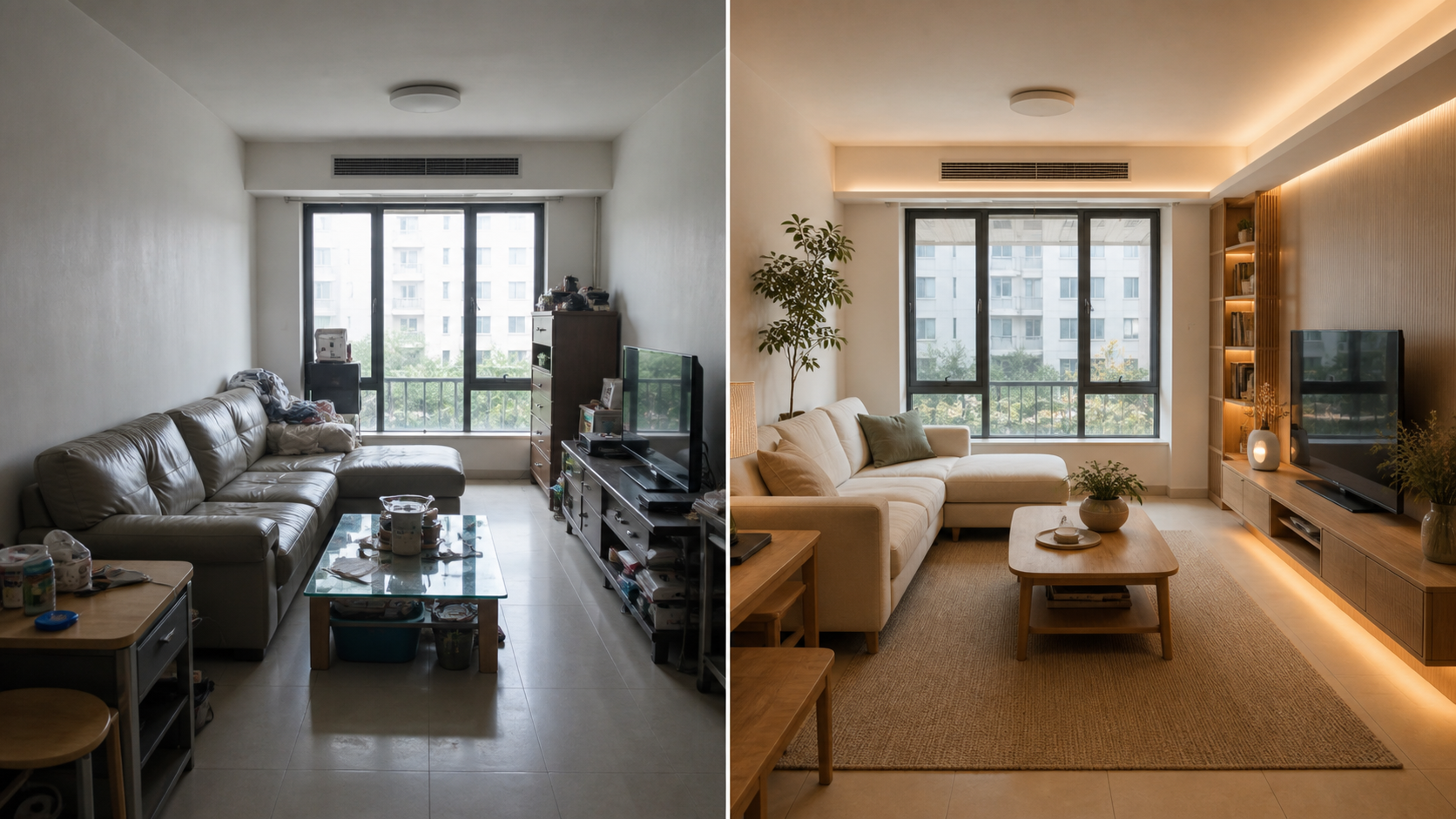
What is virtual room redesign?
Virtual room redesign means turning a current room photo into a new design concept. The goal is not to invent a random showroom. The goal is to help you answer practical questions:
- Would this room look better with a warmer color palette?
- Should the sofa, bed, desk, or dining table stay in the same position?
- Would modern, Scandinavian, Japandi, coastal, or quiet luxury fit the room?
- Can the space feel brighter without changing the layout?
- Which idea is worth buying materials for?
This is different from browsing inspiration images. A saved Pinterest image may look good, but it may not match your room size, light, windows, doors, ceiling height, or floor plan. A room redesign AI preview starts from your actual photo, so the concept is easier to judge.
How to redesign your room with AI
Use a simple workflow:
- Take a wide room photo with the floor, walls, ceiling, and windows visible.
- Upload the image to the generator.
- Select the closest room type, such as living room, bedroom, kitchen, bathroom, dining room, or home office.
- Pick a style preset or describe your preferred look.
- Generate a 1K preview with trial credits.
- Compare the before-and-after result.
- Use targeted edits for walls, flooring, furniture, lighting, or decor.
The best virtual room redesign results come from clear input photos. Avoid heavy clutter, extreme close-ups, dark photos, and angles where the room shape is hard to understand.
Best rooms for AI room redesign
Most rooms can be tested with AI, but these are the easiest starting points:
Living rooms
Living rooms benefit from layout and style testing. You can compare sofa orientation, rug size, curtains, wall color, lighting, and decor direction. For a dedicated page, use living room design ideas with AI until we add a separate living room tool page.
Bedrooms
Bedrooms are ideal for mood and material changes. Try warm minimal, Japandi, Scandinavian, soft contemporary, or dark moody concepts. For a more focused workflow, see the AI bedroom design generator.
Kitchens
Kitchen redesign AI works best for color, cabinet finish, backsplash, lighting, and style direction. Use it before you commit to paint, hardware, stone, or cabinet colors. See kitchen interior design AI for kitchen-specific guidance.
Bathrooms
Bathroom AI previews are useful for tile mood, vanity color, mirror style, storage, and lighting. If your goal is a compact bathroom, compare this with small bathroom design ideas and bathroom redesign AI.
Virtual room redesign ideas to test first
Start with ideas that change the overall feel of the room:
- Paint the walls a warmer neutral.
- Replace cool lighting with warmer layered lighting.
- Add curtains that make windows feel taller.
- Use a larger rug to connect furniture.
- Try one focal wall instead of decorating every wall.
- Simplify visible storage.
- Test wood tone, stone tone, and textile direction before buying.
After the first preview, make smaller decisions. Change the sofa color, wall art, floor tone, bedding, cabinet finish, or pendant light one area at a time.
Virtual room redesign vs virtual staging
Virtual room redesign is for people improving a room they live in or plan to renovate. Virtual staging is usually for real estate listing photos, vacant rooms, or marketing assets. Both use a room photo, but the intent is different.
If you are preparing property images for a listing, use AI virtual staging. If you are planning a personal room makeover, start with virtual room redesign.
FAQ
Can AI redesign my room from a photo?
Yes. Upload a clear room photo, choose a room type and style, and the generator can create a redesign concept from the existing room. Use the image as planning inspiration, then verify measurements, cost, and product availability.
Is virtual room redesign free?
New signed-in accounts start with trial credits for 1K previews. Paid plans and credit packs unlock more generations, edits, and higher resolution exports.
What is the best photo for virtual room redesign?
Use a wide, bright photo. Show the floor, ceiling, walls, windows, and main furniture. Avoid dark images, cropped corners, mirrors that dominate the image, and photos taken too close to one object.
Can I use room redesign AI without changing the layout?
Yes. The prompt strategy asks the model to preserve room architecture, camera angle, walls, windows, doors, and floor plan where possible while changing furniture, materials, color, and decor.
Is this a RoomGPT alternative?
AI Home Design covers a similar room photo redesign use case, but it also focuses on style presets, preservation constraints, precise room edits, and resolution-based exports. See the RoomGPT alternative page for a direct comparison.
Ready to test a redesign before buying furniture or paint? Start with the virtual room redesign generator.