
RoomGPT Alternative for AI Room Design | AI Home Design
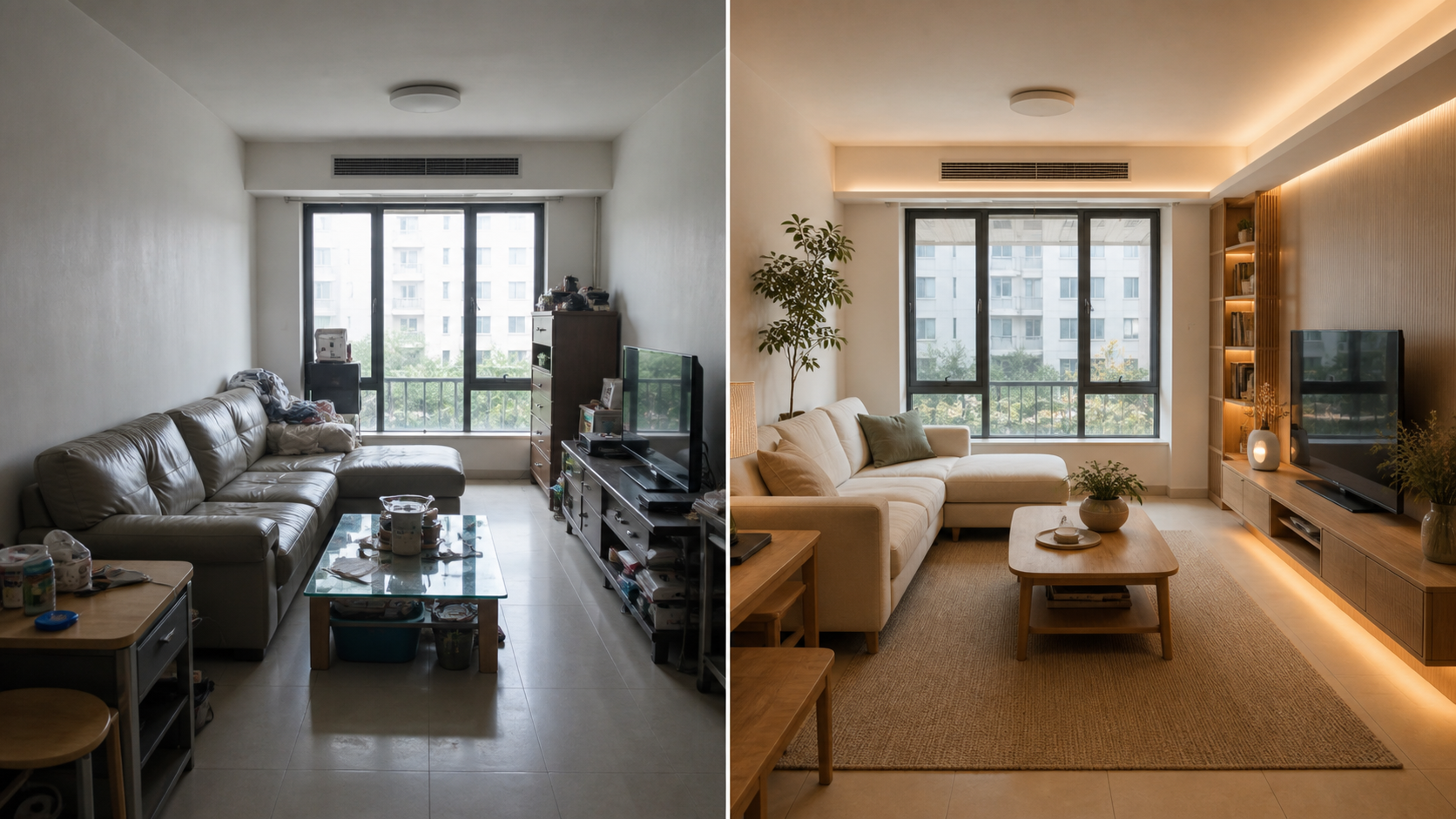
If you are looking for a RoomGPT alternative, the main question is simple: can the tool take your real room photo and produce useful redesign ideas quickly? AI Home Design is built for that workflow. Upload a room image, choose a room type and style, generate a redesign concept, then use edits and higher resolution exports when you need more control.
Start with the free AI room design generator if you want to test the workflow before comparing every feature.
Why people search for a RoomGPT alternative
Most people searching for RoomGPT alternative want one of these things:
- A room redesign tool that starts from an uploaded photo.
- More control over interior design style.
- A clearer free trial or credit model.
- Better before-and-after output.
- A tool that supports bedrooms, kitchens, bathrooms, living rooms, and home offices.
- A way to edit one part of a generated room instead of starting over.
That makes this a commercial intent search, not a generic blog topic. The page should help you choose a tool, test it, and decide whether it fits your room planning workflow.
AI Home Design vs RoomGPT: what to compare
Use these criteria when comparing any AI room design app:
Photo-based generation
A useful RoomGPT alternative should start from your actual room photo. Text-only image generation can produce attractive interiors, but it does not solve the problem of redesigning your room.
Room type controls
The tool should understand the difference between a bedroom, kitchen, bathroom, living room, dining room, and home office. Each room has different design constraints.
Style presets
Style presets reduce prompt guessing. AI Home Design includes 30 style directions, including modern, Scandinavian, Japandi, quiet luxury, coastal, art deco, farmhouse, Mediterranean, industrial, and dark moody.
Preservation constraints
The redesign should try to keep walls, windows, doors, camera angle, floor plan, and core room geometry believable. This matters if you want a planning image, not just a fantasy image.
Precise edits
After generating a full room concept, it is useful to brush one area and request a targeted edit. For example, change the wall color, replace a rug, update cabinets, adjust bedding, or test new lighting.
Export quality and pricing
Look for clear rules around trial credits, paid credits, and export resolution. AI Home Design starts new signed-in accounts with trial credits for 1K previews. Paid credit packs and plans unlock 2K and 4K exports.
Best use cases for AI Home Design
AI Home Design works best for:
- Homeowners comparing renovation ideas.
- Renters planning low-cost room upgrades.
- Creators making before-and-after room content.
- Small teams preparing concept visuals.
- People testing bedroom, kitchen, bathroom, living room, or home office styles.
If you want a broad room redesign workflow, see virtual room redesign. If you want a specific room type, start with AI bedroom design generator, kitchen interior design AI, or bathroom redesign AI.
When RoomGPT may still be enough
If you only need a quick design idea and do not care about edits, export resolution, or specific style control, a simple room generator may be enough. The best tool depends on how much control you need after the first image.
If you are planning real changes, pay attention to the workflow after generation. A first concept is useful, but the ability to refine the room is what turns it into a planning tool.
FAQ
What is the best RoomGPT alternative?
The best alternative depends on your workflow. If you want room photo upload, style presets, preservation constraints, precise edits, and resolution-based exports, AI Home Design is built for that use case.
Can I use AI Home Design for free?
New signed-in accounts start with trial credits for 1K previews. Paid credit packs and plans unlock more generations, edits, and 2K or 4K exports.
Does AI Home Design redesign real room photos?
Yes. The generator starts from an uploaded room image and creates a redesign concept based on that photo, room type, style, and prompt.
Is this only for bedrooms?
No. AI Home Design supports many room types, including bedrooms, kitchens, bathrooms, living rooms, dining rooms, home offices, and more.
What should I try first?
Start with one clear room photo and one style direction. Generate a preview, then use edits to refine one area at a time. This gives a better comparison than generating many unrelated styles.
Try AI Home Design as a RoomGPT alternative, or compare specific pages for virtual room redesign, AI bedroom design, and kitchen interior design AI.